belt TESLA MODEL S 2018 User Guide
[x] Cancel search | Manufacturer: TESLA, Model Year: 2018, Model line: MODEL S, Model: TESLA MODEL S 2018Pages: 195, PDF Size: 5.51 MB
Page 30 of 195

Always position single-strap tethers to run
over the top of the head support.
Note: To prevent the single-strap tether from
moving side to side, the top of the head support deforms.
Testing a Child Safety Seat
Before seating a child, always make sure the
child safety seat is not loose:
1. Hold the child safety seat by the belt path
and try to slide the safety seat from side
to side and front to back.
2. If the seat moves more than 2.5 cm, it is
too loose. Tighten the belt or reconnect
the ISOFIX retained child safety seat.
3. If you are unable to reduce slack, try a
different seat location or try another child
safety seat.
Child Safety Seat Warnings
Warning: Never seat a child in a child
safety seat or a booster seat on the front
passenger seat when the airbag is
activated. Doing so can cause serious injury or death.Warning: Never use a rearward facing
child restraint on a seat protected by an
active airbag. Doing so can cause serious
injury or death. Refer to the warning label
located on the sun visor.Warning: Child restraint systems are
designed to be secured in vehicle seatsby lap belts or the lap belt portion of a lap-shoulder belt. Children could be
endangered in a crash if their child restraints are not properly secured in the
vehicle.Warning: According to collision statistics,
children are safer when properly
restrained in the rear seating positions
than in the front seating positions.Warning: Do not use a forward facing
child safety seat until your child weighs
over 9 kg and can sit independently. Up
to the age of two, a child
Page 33 of 195

5.Raise the seat back to the upright position
and push until it locks into position. Visually check to ensure that the retaining
catches are engaged.
6. Check that the seat back and seat base
are securely retained in the upright
position by trying to pull the seat back
toward you.
Folding
Caution: Before folding the seats, fasten
the seat belts to prevent them from
getting trapped in the seat mechanism
and being damaged.
1. Pull the handle to release the seat back
and pull the seat back fully forward.
2. Push the lever to release the head
supports from the seat back, then fold
back onto the seat.
3. Secure the Velcro strap.
4.Pull the strap at the rear of the seat to fold
the seat assembly into the trunk floor.
5. Replace the cover on the trunk floor.
Seating a Child
The Tesla built-in rear facing child seats are
child restraint systems and are approved to
United Nations ECE Regulation R44.04
standards for use by children in Mass Groups II
and III, weighing 15 - 36 kg. These seats must
only be used for children who are between 3
and 12 years old, and 98 - 135 cm tall.
Tesla Built-In Rear Facing Child Seats
32Model S Owner
Page 36 of 195
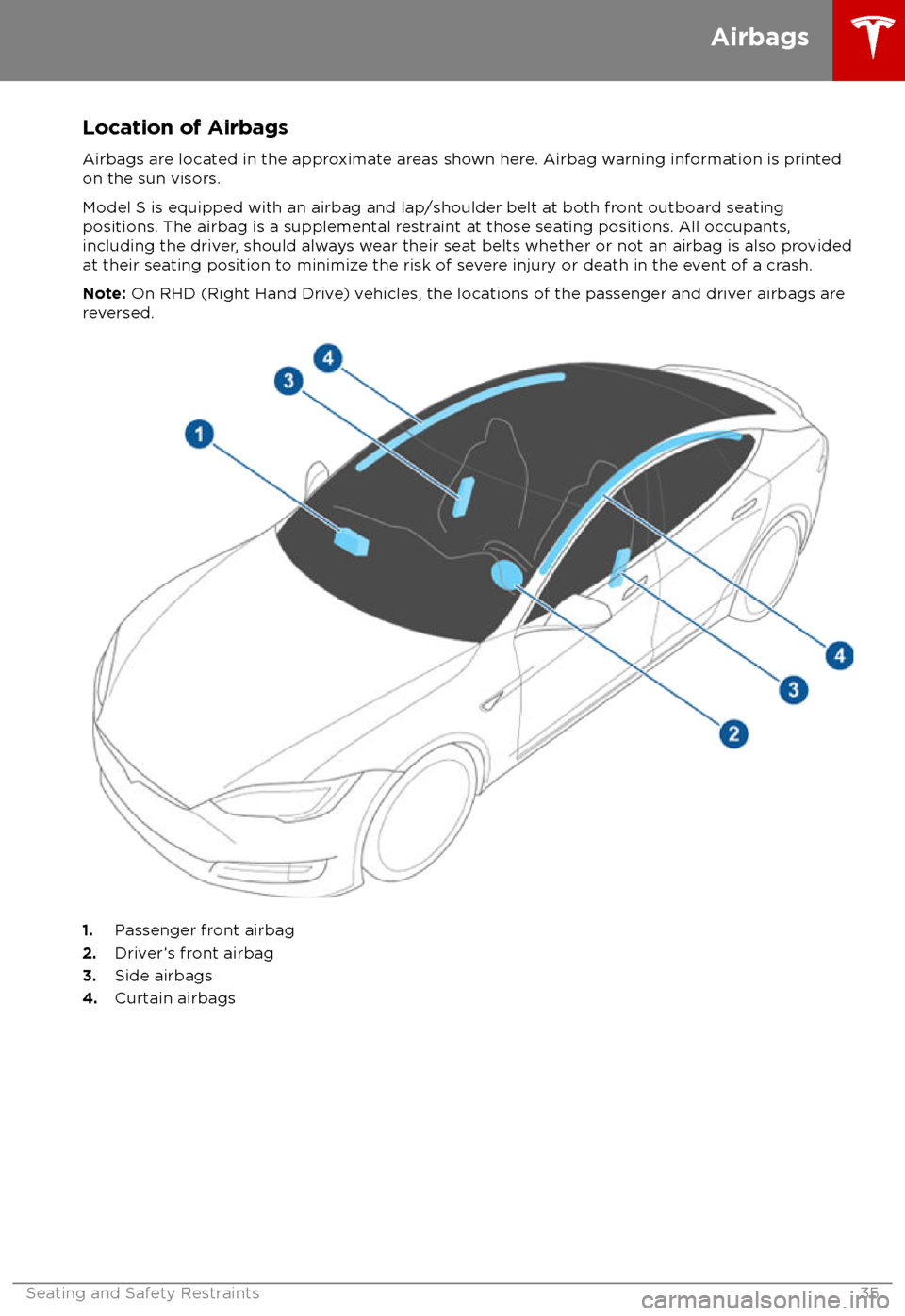
Location of AirbagsAirbags are located in the approximate areas shown here. Airbag warning information is printed
on the sun visors.
Model S is equipped with an airbag and lap/shoulder belt at both front outboard seating
positions. The airbag is a supplemental restraint at those seating positions. All occupants,
including the driver, should always wear their seat belts whether or not an airbag is also provided at their seating position to minimize the risk of severe injury or death in the event of a crash.
Note: On RHD (Right Hand Drive) vehicles, the locations of the passenger and driver airbags are
reversed.
1. Passenger front airbag
2. Driver
Page 39 of 195
bags if a collision occurs. It can also
reduce the accuracy of the occupant
detection system, if equipped.Warning: Airbags inflate with
considerable speed and force, which can
cause injury. To limit injuries, ensure that occupants are wearing seat belts and are
correctly seated, with the seat positioned as far back as possible.Warning: Do not use a child safety seat or
seat young children on a seat with an
operational airbag in front of it. Doing so
can cause injury or death if the airbag
inflates.
Warning: To ensure correct inflation of
the side airbags, maintain an
unobstructed gap between an occupant
Page 50 of 195

IndicatorDescription
The parking brake is manually applied. See Parking Brake on page 61.A parking brake fault is detected. Contact Tesla. See Parking Brake on page 61.Vehicle Hold is actively applying the brakes. See Vehicle Hold on page 66.Tire pressure warning. The pressure of a tire is out of range. If a fault with the Tire
Pressure Monitoring System (TPMS) is detected, the indicator flashes. For a TPMS
fault, contact Tesla. See Tire Care and Maintenance on page 148.A door or trunk is open. See Doors on page 4, Rear Trunk on page 10, or Front
Trunk on page 13.A seat belt for an occupied seat is not fastened. See Seat Belts on page 21.
Note: Depending on the date of manufacture, rear seating positions may not be
equipped with a seat belt reminder.
The front passenger
Page 156 of 195

Cleaning the Interior
Frequently inspect and clean the interior to maintain its appearance and to prevent
premature wear. If possible, immediately wipe up spills and remove marks. For general
cleaning, wipe interior surfaces using a soft
cloth (such as
microfiber) dampened with a
mixture of warm water and mild non-
detergent cleaner (test all cleaners on a
concealed area before use). To avoid streaks,
dry immediately with a soft lint-free cloth.
Interior Glass
Do not scrape, or use any abrasive cleaning
fluid on glass or mirrored surfaces. This can
damage the reflective surface of the mirror
and the heating elements in the rear window.
Airbags
Do not allow any substance to enter an airbag
cover. This could
affect correct operation.
Dashboard and Plastic Surfaces
Do not polish the upper surfaces of the
dashboard. Polished surfaces are
reflectiveand could interfere with your driving view.
Leather Seats
Leather is prone to dye-transfer which can
cause discoloration, particularly on light colored leather. White and tan leather iscoated with an anti-soiling treatment. Wipespills as soon as possible using a soft cloth
moistened with warm water and non-
detergent soap. Wipe gently in a circular
motion. Then wipe dry using a soft, lint-free
cloth. Using detergents or commercially
available leather cleaners and conditioners is
not recommended because they can discolor or dry out the leather.
Polyurethane Seats
Wipe spills as soon as possible using a soft
cloth moistened with warm water and non-
detergent soap. Wipe gently in a circular
motion. After cleaning, allow the seats to air
dry.
Cloth Seats
Wipe spills as soon as possible using a soft
cloth moistened with warm water and non-
detergent soap. Wipe gently in a circular
motion. Then wipe dry using a soft, lint-free
cloth. Vacuum the seats as needed to remove
any loose dirt.
Carpets
Avoid over-wetting carpets. For heavily soiled
areas, use a diluted upholstery cleaner.
Seat Belts
Extend the belts to wipe. Do not use any type
of detergent or chemical cleaning agent.
Allow the belts to dry naturally while
extended, preferably away from direct
sunlight.
Tesla Built-In Rear Facing Child Seats
Vacuum the seats to remove any loose dirt. Wipe the seats with a soft cloth dampened
with warm water. You can also use an upholstery cleaner designed for automotive
use. Extend the belts to wipe. Allow the belts
to dry naturally, preferably away from direct
sunlight.
Touchscreen and Instrument Panel
Clean the touchscreen and instrument panel
using a soft lint-free cloth
specificallydesigned to clean monitors and displays. Do not use cleaners (such as a glass cleaner) and
do not use a wet wipe or a dry statically- charged cloth (such as a recently washed
microfiber). To wipe the touchscreen without
activating buttons and changing settings, you
can enable clean mode. Touch Controls >
Displays > Clean Mode . The display darkens to
make it easy to see dust and smudges.
Chrome and Metal Surfaces
Polish, abrasive cleaners or hard cloths can
damage the
finish on chrome and metal
surfaces.
Cautions for Interior Cleaning
Caution: Using solvents (including
alcohol), bleach, citrus, naphtha, or silicone-based products or additives on
interior components can cause damage.Caution: Statically-charged materials can
cause damage to the touchscreen or
instrument panel.Warning: If you notice any damage on an
airbag or seat belt, contact Tesla
immediately.Warning: Do not allow any water,
cleaners, or fabric to enter a seat belt
mechanism.Warning: Exposure to chemical cleaners
can be hazardous and can irritate eyes
Cleaning
Maintenance155
Page 192 of 195
Max Battery Power (performance dual motor)67
media 119
mileage upon delivery 183
mirrors 44
mobile app 137Mobile Connectordescription 139
using 142
modifications 163
motor torque, reduced 95
my car does what? 181
N
naming 110
navigation 126
NCC
certifications 185
Neutral gear 46
night mode 107
O odometer 69
offset from speed limit 97
overhang dimensions 167
overtake acceleration 76
Owner Information, about 182
P Park Assist 64
Park gear 46
parking brake 61
parking, automatic 87
parts replacement 163
Passive Entry 107
Pedal Misapplication Mitigation 93
personal data, erasing 110
phonesteering wheel buttons 42
using 124
PIN 40
power management 70
power socket 122
power windows 9
powering on and
off 45
Preconditioning 107
preferences, setting 107
public charging stations 139
R
radar 73
radio 119
Radio Frequency information
185rangedisplayed on instrument panel 47
driving tips to maximize 70
regenerative braking 60
range assurance 70
Range mode 70
Range Mode 104
Rated range 107
re-routing 128
rear seats, folding and raising 19
rear view camera 72
rear window switches, disabling 9
Recent (Media Player) 121
Recents 126
regenerative braking 60
region format 107
relative speed limit 97
release notes 136
restarting the touchscreen 45
Reverse gear 46
RFID transponders 163
roadside assistance 177
roof racks 166
rotating tires 149
route overview 128
S
safety informationairbags 37
child seats 29
rear facing child seats 34
seat belts 22seat beltscleaning 155
in a collision 22
overview of 21
pre-tensioners 22
wearing when pregnant 21
seat covers 20
seat heaters 111
seating capacity 165
seatsadjusting 18
heaters 111
Tesla built-in rear facing 31
security settings 132
sensors 73
service data recording 183
service intervals 147
Settings 107
Settings, erasing 110
shifting gears 46
Show Commute Advice 128
side collision warning 91
slip start 63
Smart Preconditioning 107
Index
Index191